

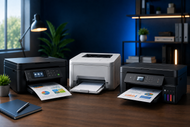
Choosing the right printer in 2026 takes more than comparing prices or picking the newest model. Your daily workload, print volume, colour needs, connection options, and long-term running costs all shape the right choice.
A home printer may suit light personal use, while an office or business printer must handle larger workloads with speed and reliability.
This guide will explain printer types, key features, and buying factors so you can select a model that fits your needs without wasting money.
What Are Printers?
A printer turns a digital file into a page, label, receipt, image, form, or tag. It receives data from a device or business system, then places ink, toner, heat marks, or impact characters onto material.
Printers now do far more than basic text output. Dot matrix printers still serve jobs that need multipart forms. InkJet Printers handle documents and photos. Laser Printers produce sharp text at speed.
Multifunction Printers can print, scan, copy, and sometimes fax. Wireless Printer models let phones, laptops, and tablets send jobs without a cable.
Printed output still matters for forms, labels, barcodes, invoices, school sheets, and handouts. Choose a machine that fits your work.
How to Choose a Printer
Start by listing what the printer must do. A student has different needs from a warehouse printing barcode labels. A small office may need one shared device with scanning, while a finance desk may care most about fast black-and-white documents.
Estimate how many pages you print each month. Check the manufacturer’s recommended monthly page volume rather than relying on the maximum duty cycle. The maximum shows a short-term limit. The recommended range reflects regular use.
Match features to real tasks. Choose wireless access if several people print from phones or laptops. Pick automatic two-sided printing for long reports. An automatic document feeder saves time when scanning a stack. Check tray size, paper support, speed, first-page time, and supply yields.
Price the printer over time. Add the machine, ink or toner, drums, printheads, maintenance parts, paper, and power. Divide supply price by stated yield to estimate cost per page. A cheap printer can become costly when small cartridges need constant replacement.
Check warranty length and local supply stock before paying, since both affect downtime after a fault or empty cartridge.
For more help with supplies and page yield, read our Ultimate Printer & Cartridges Buying Guide 2026: Tips and Recommendations. It connects printer choice with cartridges that shape long-term cost.
Understanding Your Printing Needs
Understanding Different Printing Needs starts with frequency. Occasional users may print forms, tickets, or school pages each month. Daily users may produce invoices, reports, packing slips, or customer documents.
Long gaps matter for inkjet models because liquid ink may dry around the printhead. Toner in a laser printer does not dry the same way.
Look at output type. Text-heavy work calls for clean letters, steady speed, and low black-page cost. Photos and design proofs need accurate color, smooth shading, and suitable paper.
Shipping work may need a Label Printer. Retail and warehouse systems may need a Barcode Printer that prints scannable codes on the right stock.
The setting matters too. A single desk may need a compact USB or wireless model. A shared office needs network access, user controls, tray capacity, and speed.
A business with private records should check user sign-in, secure print release, software updates, and network settings.
Types of Printers
All-in-One Printers
All-in-One Printers combine printing, scanning, and copying in one body. Some include faxing. They suit homes and small offices with limited space. Check scanner quality, feeder capacity, two-sided scanning, and control panel ease.
Barcode Printers
A Barcode Printer makes barcode labels, tags, receipts, and tracking stickers. Direct thermal models use heat-sensitive media without a ribbon, suiting shipping labels and short-life uses. Thermal transfer models use a ribbon and create longer-lasting labels for assets, products, shelves, and demanding storage areas.
Dot Matrix Printers
Dot Matrix Printers strike an inked ribbon against paper. They sound louder and print less detailed graphics than newer machines, yet they remain useful for continuous paper and multipart forms. Warehouses, transport desks, and older systems may use them for invoices and carbon copies.
InkJet Printers
InkJet Printers place tiny drops of liquid ink onto paper. They suit homes, students, creative work, and offices needing good color. Cartridge models may cost less to buy, while refillable tank models can lower page cost. Check ink yield, photo support, and printhead care.
Label Printers
A Label Printer produces adhesive labels for parcels, files, shelves, products, badges, and office organization. Choose label width, roll size, print method, cutter option, and software support. A desktop unit suits mailing; a packing area may need an industrial model.
Laser Printers
Laser Printers use toner powder and heat to place text and graphics on paper. They suit office use because they print text quickly and handle regular workloads. Check toner yield, drum life, warm-up time, paper capacity, and color toner costs.
Multifunction Printers
Multifunction Printers place print, scan, copy, and fax tools in a shared business unit. They may include larger feeders, extra trays, user accounts, scan-to-email, and secure print release. They suit departments needing one central machine.
Home Printer vs Office Printer: Which One Should You Buy?
A home printer fits light or mixed use. Compact size, wireless access, and price may matter more than top speed. An inkjet all-in-one can handle homework, forms, photos, and occasional scanning. A refillable tank may suit a family that prints color pages each week.
An office printer must cope with more people, pages, and less downtime. Look for faster first-page output, a larger tray, automatic two-sided work, network access, higher supply yields, and a recommended monthly volume above expected use. An automatic document feeder cuts manual work.
Use monthly page count as the deciding line. Do not buy a home model for work near its limit. Do not buy a large office machine for twenty pages a month.
Choosing Your Printer Type around real volume gives better speed, fewer supply changes, and less wear.
Color Printer vs Monochrome Printer
Choose a color printer for presentations, charts, photos, product sheets, school projects, design drafts, or customer material where color carries meaning.
Check every color supply, not just black. A color laser printer suits office graphics, while an inkjet may give better photo detail.
Choose monochrome for letters, invoices, contracts, reports, forms, and records that only need black text. Black-and-white laser models provide quick output and simpler supply planning. They may cost less because you replace one toner instead of a full set.
Ask one question: would losing color make the page less useful? If no, monochrome may be the smarter buy. If yes, compare page yield, quality, speed, and supply price.
Best Printers for Office and Business
The best office or business printer keeps up with the team without wasting money. Start with monthly volume, then check pages per minute, first-page time, tray capacity, automatic two-sided printing, feeder size, scan speed, and supply yield.
Handling busy periods without constant refilling saves staff time.
Small teams may prefer a wireless all-in-one laser or business inkjet. Larger groups may need a floor-standing multifunction model with extra trays, user accounts, finishing tools, and stronger access controls. Shipping teams may need a separate label or barcode printer.
Confirm drivers work with your computers, mobile devices, and business programs. Review warranty terms, supply availability, replacement parts, and update support. CTS Point can help match printer type, workload, features, and supplies.
Conclusion
Choosing a Printer for Home, Office, or Business becomes easier once you stop comparing every model at once. Define the work, count monthly pages, choose the print method, check the paper path, and calculate ownership cost.
Compare only machines that meet those needs.
A home user may need a compact wireless inkjet. A text-heavy office may need a monochrome laser. A customer-facing team may need color.
A warehouse may need a barcode or label printer. CTS Point can help you choose a model for your documents, volume, space, and budget.
Frequently Asked Questions
A: Businesses choose laser or multifunction printers for steady document work. The choice depends on volume, color, scanning, paper capacity, user count, and supply cost.
A: Choose color for charts, photos, branded material, and visual reports. Choose monochrome for text-heavy work where speed and black-page cost matter more than color.
A: Yes, when several phones, laptops, or desktops need access. Check security, setup, mobile support, and a wired option if Wi-Fi fails.
A: No printer type guarantees trouble-free use. Problems drop when the model matches monthly volume, uses suitable paper, receives updates, and has available supplies and service support.
A: Yes. CTS Point offers wireless and multifunction printer options for home, office, and business needs, with help choosing features, supplies, and capacity for the planned workload.