

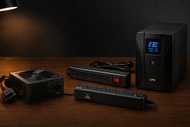
Every computer lives or dies by the quality of the power feeding it. You can spend a fortune on a processor and graphics card, then lose both to one bad voltage spike.
Poor power management shows up in small ways first: random restarts, corrupted files, drives that fail early. By the time you notice, the damage has already been done.
Understanding the Role of Power Devices in Modern Computers
Power devices are the hardware that delivers, converts, stores, or cleans electricity before it reaches your components.
The electricity from your wall socket is alternating current, and it fluctuates constantly. Your CPU, memory, and graphics card all need steady direct current at exact voltages. Power devices bridge that gap.
PC power devices also act as a shield. Spikes, sags, brownouts, and blackouts happen on every grid, everywhere. A good power chain absorbs those events so your motherboard never sees them. That's why system reliability starts at the wall, not at the processor.
The Right Power Device Can Save You Money and Hardware
A quality power device is cheap insurance. Here's what you actually get for the money:
- Less hardware damage: Clean, regulated power keeps voltage-sensitive parts like GPUs and SSDs within safe limits.
- Better stability: Stable voltage means fewer crashes, blue screens, and corrupted saves during heavy loads.
- Outage protection: Battery-backed devices give you time to save work and shut down properly when the grid fails.
- Lower long-term costs: Efficient units waste less electricity as heat, and hardware that isn't stressed simply lasts longer.
Replacing a fried graphics card costs far more than the surge suppressor that would have saved it. That math never changes.
Popular Power Device Options Available Today
Power Supply (PSU)
The Power Supply (PSU) sits inside your desktop and converts wall AC into the DC voltages your components need. Wattage, efficiency rating, and build quality decide how well it does that job.
Every desktop has one, and it's the single most important power device you'll buy.
UPS (Uninterruptible Power Supply)
A UPS is a battery that takes over the instant grid power drops. It won't run your PC for hours, but it gives you minutes to save files and shut down cleanly.
Anyone who has lost work to a blackout understands its value.
Power Distribution Unit (PDU)
A Power Distribution Unit (PDU) spreads power from one source across many outlets in a controlled way. You'll find them in server racks and multi-machine offices.
Smart PDUs also report power draw per outlet, which helps with capacity planning.
Surge Suppressors
These absorb sudden voltage spikes from lightning or grid switching before they reach your equipment. Their capacity is measured in joules, and higher is better.
They wear out silently over time, so treat them as consumables.
Power Inverters
A power inverter converts DC from a battery or solar panel into AC your computer can use. They matter for vehicles, boats, off-grid cabins, and backup battery systems.
Look for pure sine wave output when powering computers.
Power Banks
Portable batteries for charging laptops, phones, and tablets on the go. For laptop power devices, you need a bank with USB-C Power Delivery at 60W or more, since smaller units simply can't keep a laptop charged under load.
Battery Chargers
These recharge the battery packs used in laptops, UPS units, and portable gear. Battery chargers with smart circuitry stop charging at full capacity, which protects battery health and cuts fire risk.
Power Injectors
A power injector adds electrical power to an Ethernet cable, so devices like IP cameras, access points, and VoIP phones run without a separate power outlet. It's a small box that saves a lot of wiring.
Transformers
Transformers step voltage up or down between circuits. If you travel between 110V and 220V regions with equipment that isn't dual voltage, a step-down or step-up transformer is what keeps it alive.
Side-by-Side Comparison of Common Power Devices
|
Device |
Primary Purpose |
Ideal Users |
Main Advantage |
|
Power Supply (PSU) |
Converts AC to regulated DC inside a PC |
Every desktop owner |
Direct control over system stability |
|
UPS |
Battery backup during outages |
Offices, servers, remote workers |
Time to save work and shut down safely |
|
PDU |
Distributes power across many outlets |
Server rooms, labs |
Organized, monitored power delivery |
|
Surge Suppressor |
Blocks voltage spikes |
All computer users |
Cheap protection against grid events |
|
Power Inverter |
Converts DC to AC |
Mobile, off-grid, solar users |
Runs AC gear from batteries |
|
Power Bank |
Portable charging |
Travelers, students |
Power anywhere, no outlet needed |
|
Battery Charger |
Recharges battery packs |
Laptop and mobile users |
Restores portable power safely |
|
Power Injector |
Sends power over Ethernet |
Network installers |
One cable for data and power |
|
Transformer |
Changes voltage levels |
International users, industry |
Matches equipment to local voltage |
Essential Buying Factors You Should Never Ignore
Six things decide whether a power device serves you well or fails you early:
- Power output and capacity: Add up what your equipment draws, then buy 20 to 30 percent above that number for headroom.
- Protection and safety features: Overvoltage, overcurrent, and short-circuit protection should be built in, not optional.
- Device compatibility: Check connectors, voltage ranges, and wattage against your actual hardware before paying.
- Quality and durability: Solid capacitors, metal housings, and real warranties separate serious products from disposable ones.
- Manufacturer reputation: Established brands publish real specifications and honor warranties. Unknown brands frequently do neither.
- Price versus value: The cheapest option usually costs more once you factor in replacements and the hardware it puts at risk.
Safety certifications matter too. Look for UL, CE, or FCC marks, and 80 Plus ratings on PSUs, before anything else.
Matching the Right Power Device to Your Setup
- Home computer: a 500W to 650W PSU plus a basic surge suppressor covers browsing, streaming, and office work.
- Gaming computer: a 750W or higher 80 Plus Gold PSU, a quality surge suppressor, and ideally a UPS for mid-game blackouts.
- Office workstations: mid-range PSUs paired with a shared UPS so unsaved work survives an outage.
- Business and server environments: rack-mounted PDUs, redundant PSUs, and online double-conversion UPS systems that never let servers see raw grid power.
- Laptops and mobile workstations: the original or a certified USB-C charger, plus a 20,000mAh or larger power bank with at least 65W output.
Avoid These Common and Costly Buying Mistakes
Buyers repeat the same five errors year after year. Choosing purely on price tops the list, because budget units cut corners exactly where protection lives. Ignoring future upgrades comes next; a PSU sized for today's GPU may choke on next year's.
The reverse mistake also costs money, since massively oversized units run at poor efficiency. Skipping safety certifications invites fire risk into your home.
And failing to check compatibility, from connector types to regional voltage, turns a new purchase into a return shipment.
Comparing Power Consumption: Gaming Setups vs Workstations
Gaming rigs draw power in violent bursts. A modern GPU can jump from 100W to 400W in a fraction of a second, so gamers need PSUs with strong transient response and generous wattage headroom, usually 750W to 1000W.
Workstations draw steadier but sustained loads during rendering or compiling, and they carry data you can't afford to lose.
Reliability beats raw wattage here. The smart combination for a workstation is a Gold- or Platinum-rated PSU plus a UPS. For gaming, prioritize PSU quality and headroom first, backup power second.
The Future of Power Devices: Innovations Driving the Next Generation
The category is changing fast in 2026. Smart monitoring is now standard on mid-range UPS units and PDUs, with per-outlet reporting on your phone.
AI-driven power management inside newer PSUs adjusts fan curves and load balancing in real time. Efficiency keeps climbing, with Titanium-rated units wasting under 10 percent of input power.
GaN (gallium nitride) technology has shrunk laptop chargers and power banks to pocket size without cutting output. And solar-ready inverters plus battery systems are pulling home computing partly off the grid.
Simple Ways to Extend the Lifespan of Power Devices
Basic care doubles the working life of most power gear. Dust out vents and fans every few months, since dust traps heat and heat kills capacitors.
Give every device breathing room instead of boxing it into a cabinet. Never load a unit past 80 percent of its rating for extended periods.
Route cables cleanly so airflow stays open, and connectors aren't strained. And inspect cords, plugs, and indicator lights every quarter; a scorched connector is a warning, not a cosmetic flaw.
If you're building or upgrading a desktop, your PSU choice deserves its own deep look at wattage math, efficiency tiers, modular cabling, and ATX 3.1 readiness. Our guide, How to Pick the Right Power Supply Unit in 2026 for Your PC Build, breaks down each of those decisions step by step.
Conclusion
Power devices decide how long your hardware lives and how stable it runs, yet most buyers treat them as an afterthought.
Match the device to your actual setup, buy modest headroom, insist on real safety certifications, and stick with manufacturers who publish honest specifications. If you're new to this, start with a quality PSU and a surge suppressor, then add a UPS once your work has real value.
Power demands only grow from here, so a smart purchase in 2026 keeps paying off for years.
Frequently Asked Questions
A: An 80 Plus Gold PSU rated 750W or higher, paired with a surge suppressor. Add a UPS if your area has frequent outages.
A: Most UPS units include surge protection, so a separate suppressor is optional. A dedicated unit still helps for equipment not plugged into the UPS.
A: Total the wattage of every component, then add 20 to 30 percent headroom. Online PSU calculators make this quick for desktop builds.
A: Yes, if the bank supports USB-C Power Delivery at 60W or more and your laptop charges over USB-C. Smaller banks will charge too slowly to matter.
A: Quality PSUs last 7 to 10 years, UPS batteries need replacement every 3 to 5 years, and surge suppressors should be swapped every 2 to 3 years or after a major spike.
A: Overvoltage, overcurrent, and short-circuit protection, backed by UL or CE certification. On PSUs, an 80 Plus rating signals tested build quality.
A: Clean vents regularly, keep airflow unblocked, stay under 80 percent load, manage cables neatly, and inspect connectors every few months.