

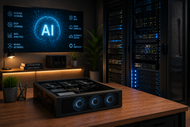
Artificial intelligence has changed what people expect from computers. In 2026, PCs handle more AI work on the device, while servers train models, process large data sets, and support shared tools.
That change has placed PC & Servers at the center of AI spending. Gartner expects worldwide AI spending to reach $2.52 trillion in 2026. It also expects spending on AI-ready servers to rise by 49 percent during the year. That spending covers the systems that keep AI running.
The right choice depends on the job, user count, data size, privacy rules, and required response time.
What Are AI PCs & Servers?
An AI PC supports one person or a small local workload. An AI server supports many users, connected devices, large models, and heavy data work.
What Is an AI PC?
An AI PC is a personal computer with processors made for local AI work. Intel defines it as a system that combines a CPU, GPU, and NPU. The CPU runs programs, the GPU handles graphics and parallel calculations, and the NPU handles supported neural network tasks.
An AI PC may remove call noise, create captions, translate speech, find files, edit images, or run a small model locally.
Microsoft sets a clear standard for Copilot+ PCs. These systems need an NPU rated at 40 TOPS or more, 16 GB of RAM, and 256 GB of storage. TOPS means trillions of operations per second. Memory, cooling, and software support still shape real results.
Types of PC
Desktops
Desktops leave more room for PC Parts, cooling, and upgrades. A desktop computer PC can carry a large graphics card, extra RAM, several storage devices, and a strong power supply. It suits gaming, video work, office use, and long AI jobs.
Laptops
Laptops place the screen, keyboard, battery, and PC Components in one portable body. AI laptops support meeting effects, captions, translation, and creative tools. Buyers should check memory, cooling, battery life, ports, and repair options instead of trusting the AI label alone.
Notebooks
A notebook means a thin, light laptop made for travel, study, and office work. Large local models may run poorly when it has low memory, weak cooling, or no dedicated GPU.
POS Systems
A POS System records sales, accepts payments, and tracks stock. AI can help spot unusual transactions, estimate stock needs, read products, and study sales patterns. Retailers still need stable checkout software and secure payment hardware.
Workstations
Workstations serve engineers, designers, researchers, video teams, and 3D artists. They commonly carry more RAM, stronger GPUs, extra storage, and better cooling than normal PCs. An AI workstation can run larger local models and test tools before work moves to a server.
What Is an AI Server?
An AI server is a server computer made for model training, inference, data analysis, automation, and shared AI services. It combines server CPUs, GPUs, or other AI chips, large memory pools, fast storage, network links, cooling, and server software.
Training teaches a model from data. Inference uses that model to answer a request, identify an image, create text, or make a prediction.
A company may run one AI server for private search or video analysis. A data center may connect many servers for larger models and user demand.
Types of Servers
Server
AI servers come in tower, rack, blade, and dense GPU forms. A tower server can fit in a small office or lab. Rack servers slide into data center cabinets. Blade systems place slim server units inside one frame. Dense systems pack several GPUs into one machine.
Buyers need to check space, power, cooling, noise, network speed, repairs, and room for later Server Parts.
Software
Software turns server hardware into a working AI system. It may include an operating system, GPU control software, model libraries, containers, security tools, schedulers, PyTorch, and TensorFlow.
Virtual machines and containers divide one server into separate work areas. Schedulers assign jobs, while monitoring tools track heat, failures, and memory use.
What Makes an AI PC & Server Run?
A fast AI chip does not work alone. Memory, storage, cooling, power, software, and networking must keep data moving without creating a slow point.
What Powers an AI PC?
An AI PC sends each task to the processor that fits it. The CPU handles general work, the GPU takes graphics and parallel calculations, and the NPU handles supported neural network work.
Core Key Components of PC:
CPU: Runs the operating system, programs, and general work.
GPU: Handles games, video, 3D work, image creation, and many AI calculations.
NPU: Handles supported jobs such as voice cleanup, camera effects, image work, and local inference.
RAM: Holds active programs and data. Copilot+ PCs need 16 GB, while heavier work may need 32 GB or more.
Storage: An NVMe SSD loads files quickly, while enough capacity holds local models and media projects.
Motherboard, cooling, and power: These PC parts connect, cool, and feed the system. Weak support parts can hold back an expensive processor.
What Makes an AI Server Powerful?
An AI server gains strength from parallel processing, large memory, fast data movement, and steady operation. More GPUs help only when storage, networking, power, and cooling keep pace.
NVIDIA builds AI data center systems around GPUs, CPUs, network processors, switches, optics, and software. Buyers must judge the whole system, not one expensive chip.
Core Key Components of Servers:
GPUs or AI accelerators: Handle model training and inference by processing many calculations at once.
Server CPUs: Run the operating system, prepare data, manage services, and coordinate GPU work.
System memory and GPU memory: Hold model weights and active data.
High-speed storage: Reads training data, saves checkpoints, and stores finished results.
Networking and interconnects: Fast Ethernet, InfiniBand, and direct GPU links move data between chips and machines. Slow links leave processors waiting.
Power and cooling: Redundant power supplies, airflow, and liquid cooling protect the equipment.
Server software: Containers, security controls, schedulers, and monitoring tools manage work.
Use Cases of AI PCs vs AI Servers
| Category | AI PCs | AI Servers |
| Personal Productivity | Writing, notes, captions, search, and translation for one user | Shared assistants and the company search for many staff members |
| Content Creation | Photo work, video editing, music tools, and small local models | Team rendering, media libraries, and heavy generation jobs |
| Gaming & Entertainment | AI upscaling, effects, streaming, and voice cleanup | Cloud gaming, multiplayer services, and recommendations |
| Education & Learning | Study support, coding help, captions, and language tools | Research systems, shared learning tools, and virtual labs |
| Business & Office Work | Email, reports, calls, spreadsheets, and local files | Company automation, databases, and shared business apps |
| Data Processing | Small data sets, local analysis, and model tests | Training, forecasting, live analysis, and large data sets |
| Security & Surveillance | One device or a small group of camera feeds | Central analysis across many cameras, sites, or sensors |
| POS Systems & Retail | Checkout help, stock checks, and local suggestions | Chain-wide planning, fraud checks, and stock analysis |
| Workstations & Industrial Use | CAD, 3D work, engineering, and machine control | Simulation, factory analysis, and shared engineering models |
Cost Comparison: AI PCs vs AI Servers
AI PCs carry a lower cost because they serve one person or a small local workload. A buyer pays for the computer, applications, accessories, and normal electricity use. Desktop owners may replace selected PC Components later instead of buying a full new system.
AI Servers carry a very high cost. Enterprise GPUs, server CPUs, error-correcting memory, fast storage, network equipment, racks, backup power, cooling, security, support, and trained staff all add to the bill.
Cloud rental may suit short projects. Owned servers may suit steady work, private data, and teams that can manage the system. Buyers should measure model size, user count, data volume, privacy rules, and working hours before spending.
PCs and servers also affect storage, security, daily work, and expansion. Our Guide to The Role Of IT Hardware On Business Growth And Scalability 2026 explains how a wider hardware plan supports business growth and helps companies avoid equipment that does not match their real needs.
Future Trends in AI PCs and AI Servers (2026)
AI PCs Becoming Common: NPUs now appear across more desktops and laptops. Software makers have added local search, captions, image tools, and meeting features. The AI label will matter less as NPUs become a normal part of PC design.
Edge AI Growth: Stores, cameras, factories, vehicles, and medical devices will process more data near their source. Local processing cuts delay and lets some systems keep working during a poor connection.
AI Server Expansion: Gartner expects spending on AI-ready servers to rise by 49 percent in 2026. Companies need them for model work, private assistants, security, video, and shared services.
Better Hardware Integration: Chip makers place CPUs, GPUs, and NPUs closer together. Software can send each job to the processor that handles it best.
Automation with AI: PCs will handle more personal routines. Servers will manage larger workflows across teams, shops, machines, and customer systems. People still need to check data, access rights, and the final output.
Hybrid Systems: Many companies will mix local AI PCs, owned servers, and cloud systems. A PC may handle a private or time-sensitive task, while a server handles the larger model.
Energy Efficiency: Power and cooling costs will shape more purchases. Buyers will compare useful work per watt, not raw speed alone.
Conclusion
PC & Server Computer systems now split the AI workload. AI PCs bring local tools, quick responses, and a lower starting cost. AI servers handle large models, shared services, heavy data work, and long operating hours.
Buyers should start with the software, data, users, privacy needs, response time, and budget. A costly GPU cannot fix too little memory, slow storage, poor cooling, or weak software support.
Frequently Asked Questions
A: AI servers train models, run inference, process large data sets, study video, support private assistants, detect fraud, forecast demand, and run shared AI tools. They suit work that needs more memory, speed, or users than one PC can handle.
A: AI servers can make financial sense when a company runs steady, heavy workloads and keeps the hardware busy. Low use, high power bills, weak planning, or a lack of trained staff can turn the same server into an expensive, unused asset.
A: AI servers can process work faster, support shared tools, and automate repetitive tasks. The business still needs clean data, clear rules, secure access, suitable software, and people who check the output.
A: GPUs handle many calculations at the same time. Model training and inference repeat large groups of mathematical operations, so GPUs finish those jobs faster than CPUs in many AI workloads.
A: An AI PC supports one user or a small local job. An AI server supports larger models, more data, many users, and long-running work.
A: An AI PC contains a CPU, GPU, NPU, RAM, SSD, motherboard, cooling system, network hardware, and power system. The operating system and applications must also support the AI hardware.
A: AI PCs can suit gaming and content creation when they include a capable GPU, enough RAM, fast storage, and proper cooling. The NPU supports selected AI features, but it does not replace a dedicated GPU for demanding games, 3D work, or high-resolution video.
A: Choose an AI PC for personal work, study, office tasks, gaming, local AI tools, or small creative projects. Choose an AI server when many people need the same service, the workload uses large models or data sets, or the system must run demanding jobs for long periods.