

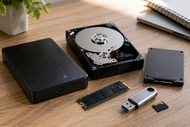
Data now sits behind class files, 4K video, shop orders, hospital scans, and AI models. Each task depends on storage devices that save, find, protect, and move data without slowing people down.
The question is not only, “How much space do we need?” It is, “Can our storage keep up?” Speed affects boot time, app loading, database access, backups, and analytics. Security protects private files. Scalability helps users grow without replacing everything too soon.
HDDs still handle large, low-cost storage. Solid State Drives (SSD) and NVMe drives carry the speed load. NAS, RAID Storage, tape, Cloud Storage, and hybrid systems help users balance cost, access, and risk.
Why Smart Storage Matters?
Smart storage matters because data has become too active, too large, and too sensitive for random drive choices. A PC Storage Device affects how fast your system feels, how safely your data stays, and how well your setup grows.
Data Growth & Modern Workloads
AI, cloud apps, IoT devices, video files, virtual machines, and analytics tools create heavy data pressure. Storage plans can affect data access, cybersecurity, downtime, compliance, and business continuity.
Traditional storage falls short when one drive must support backups, live apps, team files, and reports at the same time. These workloads need planned storage tiers.
Performance-Driven Storage Needs
Performance starts with the drive type, connection, workload, and file system. SSDs use flash memory for faster access, while HDDs use spinning disks and give larger capacity at a lower cost. SSDs bring faster read and write speeds, lower latency, and higher reliability than HDDs for demanding work.
Low latency matters when databases, virtual machines, and apps ask for data all day. A slow storage drive can make a strong processor feel weak.
Scalability for Future Expansion
Scalability means your storage can grow as data grows. StoneFly explains two paths: vertical growth, where you add more disks or resources to the same system, and horizontal growth, where you add more storage nodes to a networked system.
Modular storage, NAS, Cloud Storage, and hybrid expansion keep growth controlled and avoid one large replacement cycle.
Read our A Guide to The Role Of IT Hardware On Business Growth And Scalability 2026 for the wider link between storage, servers, networking, workstations, backup tools, and business growth.
Key Storage Disk Technologies Powering 2026
The different types of storage devices solve different problems. The right setup may include several Storage Drives rather than just one device.
Hard Disk Drives for High Capacity
Hard Disk Drives still make sense for bulk data, backups, video archives, surveillance files, and enterprise storage farms. HDDs give more capacity for the money, so they fit jobs where speed matters less than total space.
Solid State Drives for Speed
Solid State Drives (SSD) handle speed-sensitive work. They help operating systems start faster, apps open quicker, and files respond with less delay.
NVMe SSDs connect through PCIe and move data much faster than older SATA SSDs when the system supports them. In 2026, NVMe is the main choice for fast internal storage.
Tape Storage for Backup & Archiving
Tape sounds old, but enterprise backup teams still use it for long-term cold storage. LTO lists LTO-10 capacity at 30 TB and 40 TB native, with up to 75 TB and 100 TB compressed, and mentions offline air-gapped protection for ransomware defense.
Tape fits archived records, legal retention, research data, and backup copies.
USB Flash Drives & Storage Media:
USB flash drives, memory cards, and other Storage Media help with quick transfer, field work, printer files, photos, and recovery tools. They work well for portable storage devices for business use, but not as the only backup copy.
Internal & External PC Storage Ecosystem
A good PC storage setup handles daily speed and backup safety at the same time. Internal Storage Devices do the main work. External Storage Devices add space and recovery options.
Internal Hard Drives for System Performance
Internal drives connect directly to the motherboard and support the operating system, apps, documents, databases, and local project files. For fast systems, an internal NVMe SSD should hold the operating system and main apps.
External Hard Drives for Flexibility
External hard drives give quick storage expansion without opening a computer. They work well for backups, media libraries, project handoff, and off-site backup rotation.
Hybrid Storage Environments
Hybrid storage combines SSD speed with HDD capacity. A common setup keeps the operating system, active projects, and databases on SSDs, then moves backups, logs, and archives to HDDs or Cloud Storage.
Enterprise hybrid systems add NAS, SAN, RAID, object storage, and cloud backup to match cost with access needs.
Storage Devices by System Type
Key storage devices in modern computers depend on the machine’s job. A gaming PC, office laptop, print server, and data center rack all need different drive mixes.
Desktop Hard Drives
Desktop Hard Drives suit personal computing, design work, gaming libraries, and local backup. Desktops give more upgrade room than laptops, so users can mix NVMe SSD speed with HDD capacity.
Laptop Hard Drives
Laptop Hard Drive choices focus on compact size, battery life, heat, and shock resistance. Most new laptops favor SSDs because they use less power, resist movement better, and make the system feel faster.
Server Hard Drives
Server Hard Drives must support 24/7 workloads, heat, vibration, and higher write activity. Enterprise storage systems for data centers may combine HDDs for capacity, SSDs for speed, RAID for availability, and monitoring tools for early drive failure warnings.
Printer Hard Drives
A Printer Hard Drive stores print jobs, queues, fonts, logs, and scanned files in office printers. Old print jobs and scans may contain contracts, payroll files, IDs, or customer data, so teams should wipe printer drives before resale or disposal.
Storage Media Devices
Storage Media Devices include flash drives, SD cards, optical discs, portable SSDs, and removable drives. Cross-device compatibility matters because format choice affects where the drive can open.
Advanced Storage Device Infrastructure & Expansion
Advanced storage is about shared access, uptime, and controlled growth. This is where Business Storage Devices move beyond one drive per computer.
Network Storage Devices (NAS)
A Network Attached Storage (NAS) device gives teams one shared place for files, backups, and media. AWS describes file storage as a folder and file format widely used by applications, with NAS commonly using SMB for Windows and NFS for Linux.
A network storage device for the home can store family photos, PC backups, and camera footage. In business, NAS supports file sharing, permissions, and central backup.
Storage Arrays & RAID Systems
Storage arrays group several drives inside one system. RAID Storage can improve availability, speed, or both, depending on the RAID level.
IBM defines RAID as a way to improve data availability through arrays of disks and striping methods. It also explains that arrays can provide higher transfer rates than a single drive and can add redundancy so data is not lost after one drive failure, depending on the RAID level.
RAID Controllers & Performance Scaling
RAID controllers manage how data gets written across drives. Hardware RAID adapters can give better performance than software RAID by offloading work from the main processor.
Storage Drive Accessories & Enhancements
Accessories affect compatibility, heat, speed, and physical safety.
Hard Drive Accessories
Hard drive accessories include SATA cables, power cables, USB adapters, drive trays, screws, mounting brackets, thermal pads, and docking stations. A loose cable or a poor adapter can look like a drive failure.
Expansion Enclosures & Add-ons
Expansion enclosures let users add drives without replacing the main machine. A USB-C enclosure can turn an old laptop SSD into fast external storage, while a multi-bay enclosure can support RAID.
Optimizing Storage Performance
Storage performance improves when drives stay cool, firmware stays current, free space stays healthy, and workloads sit on the right drive type. Caching stores frequently accessed data in high-speed memory, reducing retrieval time from slower storage devices.
For SSDs, TRIM helps manage unused blocks and protect speed over time.
Performance vs Security vs Scalability
Good storage planning balances speed, protection, and future growth. Focusing on only one can create trouble later.
Speed Optimization Techniques
Use NVMe SSDs for operating systems, active projects, databases, and virtual machines. Keep HDDs for backups, archives, and large files that do not need instant access.
Avoid defragmenting SSDs; use TRIM instead. Cache, indexing, and file cleanup also reduce wait time during repeated access.
Data Protection & Encryption
Secure storage systems need encryption, access control, backup rules, and safe disposal. Storage security tools include self-encrypting drives, secure data erasure, and trusted platform modules. SEDs encrypt data as it is written and decrypt it when read.
DLP is a way to protect sensitive data from theft, loss, and misuse by tracking data and enforcing security policies.
Scalable Storage Planning
Scalable business Data Storage Solutions should begin with data classes: active, shared, backup, archive, private, and regulated. Active data needs speed. Shared data needs permissions. Backups need isolation. Archives need a low cost. Private data needs encryption and access limits.
Computer Storage Solutions by User Needs
Computer Storage Solutions work best when they match the user.
Home & Personal Storage
Home users need simple backup, photo storage, media libraries, and device recovery. A good home setup may include an internal SSD, an external backup drive, and Cloud Storage for phone photos or critical files.
Small Business Storage
Small businesses need a cost and performance balance. A small office may use SSD laptops, a NAS for shared files, external backups, and cloud backup for off-site recovery.
Portable business drives should be encrypted, tracked, and limited to approved files.
Enterprise & Data Center Storage
Enterprise storage needs high availability, fast recovery, strict access control, and strong monitoring. Data centers use RAID, SAN, NAS, object storage, SSD tiers, HDD pools, and backup systems.
Cloud Storage also supports business continuity because providers manage storage servers, infrastructure, capacity, security, and availability across large data centers.
Best Practices for Storage Device Optimization
Good storage care prevents slow systems, lost files, and failed recovery.
Backup & Recovery Strategies
A backup plan should include local backups, off-site backups, tested restores, and protected admin access. Whereas automated backup, off-site backup, cloud backup, disaster recovery planning, and regular restore testing are part of a strong storage plan.
Test recovery before a bad day forces the question.
Storage Lifecycle Management
Storage lifecycle management means moving files based on age, value, and access rate. Hot data belongs on fast storage, warm data can sit on NAS or lower-cost SSD pools, and cold data can move to HDD, tape, or archive cloud tiers.
Monitor drive health, spare capacity, error counts, temperature, and warranty age.
Avoiding Performance Bottlenecks
Bottlenecks appear when too many users, apps, or virtual machines hit the same slow drive. Storage tiering, load balancing, enough network bandwidth, and separate backup windows reduce pressure.
For offices, the network can slow NAS access as much as the drives. Fast storage still needs a strong connection path.
Future of Smart Storage Devices
Smart storage devices in 2026 are becoming more automated, more distributed, and faster.
AI-Based Storage Management
AI-based storage management can predict capacity use, spot unusual access patterns, and warn teams before failure. AI and machine learning can forecast storage needs, automate data management tasks, and detect security anomalies in large data sets.
Edge Storage & Distributed Systems
Edge storage places data close to where devices create it. Factories, stores, clinics, cameras, and remote offices may process data locally before sending selected files to a cloud or data center.
This reduces latency, saves bandwidth, and keeps important local systems working when internet access drops.
Next-Gen SSD & NVMe Growth
Next-gen SSD and NVMe growth will keep pushing speed for workstations, servers, AI systems, and content teams. PCIe Gen 5 SSDs already offer much higher bandwidth than older PCIe generations when the hardware supports them.
Fast storage will not remove HDDs, tape, NAS, or cloud. It will make tiered storage planning more useful.
Conclusion
Smart storage means your data stays fast, protected, and ready to grow. The right mix may include SSDs for active work, HDDs for capacity, NAS for shared files, RAID for availability, tape for long-term archives, and Cloud Storage for off-site access and recovery.
No single storage device solves every need. A strong setup matches each workload with the right storage layer, so homes, small businesses, and enterprises can keep files accessible, systems responsive, and data protected in 2026.
Frequently Asked Questions
A: Smart storage devices are storage systems that manage speed, protection, access, and growth better than a basic drive. They may include SSDs, NAS units, RAID arrays, encrypted drives, cloud storage, and systems with health monitoring.
A: Improve storage performance by placing active files and apps on SSD or NVMe storage, keeping enough free space, using TRIM for SSDs, and moving old data to slower storage. Caching, indexing, firmware updates, and better workload placement also reduce delays.
A: RAID storage uses multiple drives as one storage system to improve availability, speed, or both. It matters because a proper RAID setup can keep data available after a drive failure, but RAID should still be paired with backups.
A: An SSD uses flash memory and has no spinning parts, so it reads and writes data with less delay. An HDD uses magnetic platters, gives a lower cost per terabyte, and still works well for backups, archives, and large storage pools.
A: Enterprise storage performance improves when teams separate hot, warm, and cold data across the right storage tiers. SSD pools, RAID controllers, cache, faster networks, monitoring, and planned backup windows help reduce slowdowns.
A: NVMe SSDs will lead speed-focused storage, while HDDs, tape, NAS, and Cloud Storage will keep serving capacity, backup, archive, and shared access needs. The future will use mixed storage layers instead of one winning device.
A: Scalability is very important because data growth rarely stops after the first storage purchase. A growth-ready system lets users add drives, nodes, cloud capacity, or archive tiers without rebuilding the whole setup.
A: Cloud Storage is not fully replacing traditional storage devices. It works beside local SSDs, HDDs, NAS, RAID arrays, and tape because businesses still need fast local access, offline backup, cost control, and control over sensitive data.